
McDVOICE is McDonald’s U.S. receipt survey at www.mcdvoice.com. The live page asks for a 26-digit Survey Code, gives an alternate receipt-entry link when that long code is missing, and shows a validation code after completion. McDonald’s own FAQ also tells customers to keep the receipt handy and says the validation code is used on a future visit.
McDVOICE survey details at a glance
Is www.mcdvoice.com the McDonald’s customer survey website?
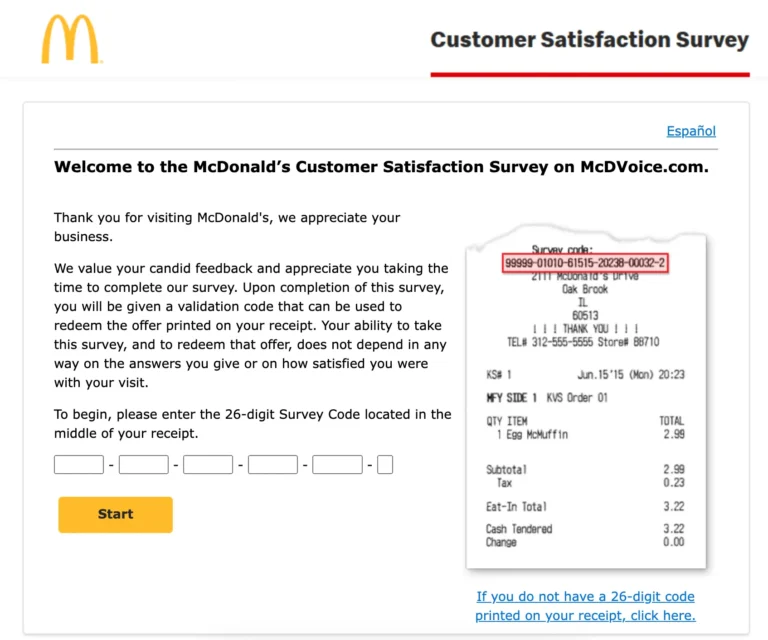
Yes. The live McDVOICE.com page is the McDonald’s Customer Satisfaction Survey entry used by receipts that point customers to that address. The current entry asks for a 26-digit Survey Code.
Use the exact address printed on the receipt
Google suggestions include “mcdvoice com”, “www mcdvoice com”, and “mcdvoice.com survey official site”. They describe the same navigation task. Type the address printed on the receipt instead of trusting a look-alike page.
McDVOICE is available in English and Spanish
The live survey has English and Spanish language routes. Choose the language before entering receipt data. A separate McDonald’s survey at MyMcDonaldsVoice.com currently uses a different 28-digit code flow.
What do you need for the McDVOICE survey?
You need the McDonald’s receipt tied to the survey invitation and an internet-connected device. McDonald’s says its receipt survey is online only, so there is no phone version of the questionnaire.
| What you have | What to do |
|---|---|
| Receipt with 26-digit Survey Code | Enter the code at McDVOICE.com. |
| Receipt without the 26-digit code | Use the alternate entry link and enter the requested visit details. |
| No physical receipt | The standard receipt survey may not have enough transaction data to start. |
| McDonald’s app account | Do not use app credentials in place of receipt data. |
McDonald’s Rewards FAQ separately says only physical receipt information is accepted when a customer submits a receipt for missing Rewards points. That Rewards process is separate from McDVOICE, but it confirms why receipt fields matter.
McDVOICE.com survey with receipt code
The standard live McDVOICE screen asks for a 26-digit Survey Code printed in the middle of an invited receipt. The form splits the number into groups of 5 + 5 + 5 + 5 + 5 + 1 digits.
What if the receipt has no 26-digit code?
The live McDVOICE page provides an alternate-entry link. That route can ask for receipt data including store number, KS number, date, time, order number, and amount spent. Enter the field the form names; do not substitute one receipt number for another.
No 26-digit code is different from no receipt
| Situation | Best route |
|---|---|
| 26-digit code is visible | Use the standard code form. |
| Long code is missing but receipt is readable | Use the alternate receipt-entry route. |
| Long code has faded but visit details remain | Try the alternate receipt fields shown by the live form. |
| Receipt is completely lost | The normal receipt-based entry data may no longer be available. |
For a longer walk-through of the receipt fields, use our McDonald’s customer satisfaction survey steps.
McDVOICE survey login: do you need an account?
No normal username-and-password login is used for the receipt survey. Searches for “McDVOICE survey with receipt code login” usually point to the receipt-code entry screen, where a customer enters the 26-digit code or alternate receipt details.
Receipt entry is not a McDonald’s app login
The McDonald’s app has its own account, offers, and Rewards codes. McDVOICE uses receipt survey data. Do not enter a McDonald’s app password into a survey code field.
How to complete the McDVOICE survey
The current process starts with the receipt and ends with a validation code. McDonald’s FAQ confirms that the validation code appears after the survey is completed.
Keep the McDonald’s receipt
Use the receipt that contains the survey invitation. A private photo can help if thermal paper fades, but the printed offer may still require the original receipt.
Open www.mcdvoice.com
Use the exact URL from the receipt. The live page currently asks for a 26-digit Survey Code.
Enter the survey code or alternate receipt details
Copy all 26 digits when the long code is present. If it is missing, choose the alternate link and enter only the receipt fields requested on screen.
Answer the visit questions
Rate the visit tied to that receipt. The survey can ask about food, service, order accuracy, cleanliness, and the restaurant experience.
Submit the survey
Complete the required questions and wait for the final screen. Do not close the tab before checking whether a validation code appears.
Save the validation code
Write the code on the receipt when instructed, then read the printed offer for its item, purchase condition, expiry, and location terms.
Our McDVOICE rules guide covers receipt-controlled deadlines and eligibility in more detail.
What questions does the McDVOICE customer survey ask?
The questionnaire is about the visit tied to the receipt. The exact wording can change, so this page does not publish an answer key or claim that a PDF copy stays current.
Food, order, service, and restaurant questions
Questions can cover food quality, order accuracy, service speed, staff interaction, cleanliness, and satisfaction. Give the rating that matches the visit; a positive score is not required to receive the printed receipt offer.
Is there a McDVOICE questions and answers PDF?
McDonald’s says the receipt survey is online only. A “McDVOICE questions and answers PDF” is not needed to complete it, and a third-party PDF cannot know the answer to a customer’s own experience.
For more on the questionnaire, see our McDonald’s survey questions guide.
What is the McDVOICE validation code?
The validation code is the code shown after survey completion. McDonald’s FAQ says the customer receives it at the end of the survey and can use it on a future visit.
| Code | When it appears | What it does |
|---|---|---|
| 26-digit Survey Code | On an invited receipt | Starts the McDVOICE survey. |
| Validation code | After survey completion | Redeems the offer printed on the receipt under that offer’s terms. |
| McDonald’s app code | Inside the app | Belongs to the app or Rewards system, not the receipt survey. |
For redemption details, use our McDonald’s survey validation-code redemption guide.
Does the McDonald’s survey give free food?
McDVOICE does not state one universal free-food item for every receipt. The live survey says the validation code is used to redeem the offer printed on the receipt, so the receipt controls the item and purchase condition.
What is the McDVOICE survey offer today?
There is no single nationwide “offer today” shown on the public landing page. Two customers can receive different receipt offers. Check the exact wording printed on your own receipt before planning a redemption visit.
Does McDVOICE offer a $250 survey reward?
The current McDVOICE landing page does not advertise a $250 cash survey prize. Pages or messages that promise a cash reward should not be treated as the standard McDVOICE receipt offer.
Can you get a free validation code online?
No code generator is needed. A Survey Code starts from an eligible receipt, and the validation code appears after survey completion. SMG terms also warn users not to share unique survey codes.
See the McDVOICE rewards guide for receipt-offer examples and redemption checks.
26-digit McDVOICE code vs 28-digit MyMcDonaldsVoice code
McDVOICE.com currently asks for 26 digits. MyMcDonaldsVoice.com is a separate live McDonald’s Customer Satisfaction Survey that currently asks for a 28-digit code and also supports a QR code from the receipt.
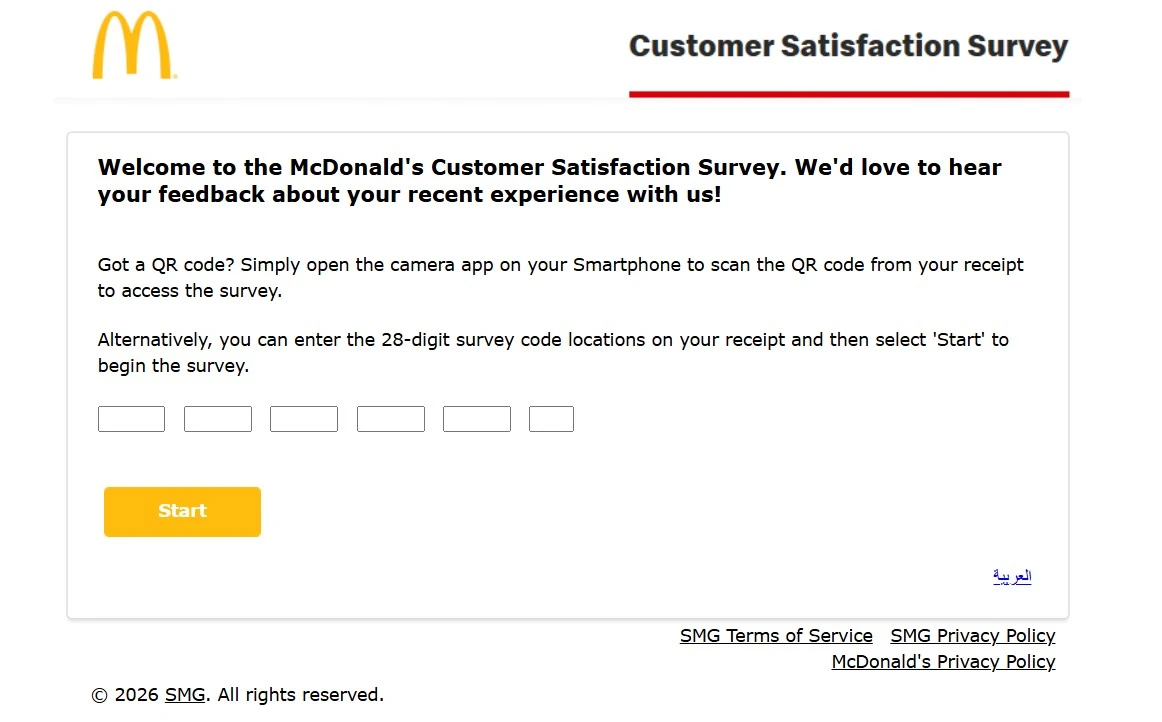
Do not enter a 28-digit MyMcDonaldsVoice code into the 26-digit McDVOICE boxes. Use the survey address printed on the same receipt as the code.
Not sure which survey your receipt uses? Our MyMcDVoice guide compares McDVOICE.com and MyMcDonaldsVoice.com side by side.
Can you use a McDVOICE validation code in the McDonald’s app or kiosk?
McDonald’s public survey FAQ confirms the validation code but does not publish an app-entry field for McDVOICE receipt offers. Current Reddit discussions from July and August 2026 report that users often redeem receipt offers through crew at the counter or drive-thru when no kiosk field is available.
Community reports are not official policy
A July 26, 2026 Reddit thread includes customers saying the receipt survey reward is not entered at a kiosk and is handled by crew. Treat that as current user experience, then follow the wording on your receipt and ask the restaurant before payment.
MyMcDonald’s Rewards is a different system. McDonald’s app FAQ says Rewards can generate their own in-store code, which should not be confused with a McDVOICE validation code.
How long do you have to complete McDVOICE?
Use the survey deadline printed on your receipt. McDonald’s public U.S. survey FAQ does not state one nationwide seven-day McDVOICE deadline, so this page does not treat seven days as a universal rule.
The seven-day rule on McDonald’s Rewards FAQ applies to submitting a physical receipt for missing Rewards points. That is a separate Rewards process and should not be copied into McDVOICE survey timing.
McDVOICE not working? Check the exact problem
Most failures happen at one of four points: the website, receipt entry, survey session, or validation-code stage. Check the failing stage before trying a different receipt number.
| Problem | What to check | Next action |
|---|---|---|
| McDVOICE.com will not load | Exact URL, browser, network | Retry the official address in a current browser. |
| 26-digit code is rejected | All 26 digits and receipt deadline | Re-enter the printed code once. |
| Receipt has no long code | Alternate entry link | Use the requested receipt fields. |
| Code says already used | Whether that unique code already submitted a response | Do not reuse or share a used code. |
| No validation code appears | Whether the survey reached its final completion screen | Keep the receipt and record any error before contacting support. |
| Restaurant refuses the offer | Expiry, purchase condition, location wording | Ask the manager to review the printed terms before payment. |
Why does a code say it was already used?
SMG’s survey terms say a unique survey code or link cannot be reused after responses have already been submitted. A code posted publicly can stop working after another person uses it first.
What if McDVOICE will not load on a phone?
Confirm www.mcdvoice.com, use a current browser, and retry on a stable connection. Keep the receipt while testing because the printed code and offer terms are still needed.
Need a deeper fix? Use the McDVOICE not working troubleshooting guide for invalid codes, alternate-entry errors, missing validation codes, and app or kiosk problems.
What if the McDonald’s receipt is faded or hard to read?
Receipt paper fades with heat, light, and time, so take the survey soon after the visit. If some digits are hard to read:
- Use side lighting. Tilt the receipt under a lamp or window. Faint print often shows better at an angle.
- Photograph and zoom. Take a sharp phone photo and zoom in instead of guessing from the paper.
- Check look-alike digits. 0 and 8, 1 and 7, 3 and 8, and 5 and 6 are easy to mix up on faded print.
- Try the alternate entry. If the 26-digit code is unreadable but the store number, date, time, and order details are clear, use the no-code link on www.mcdvoice.com.
- Stop if you are unsure. Guessing digits will not unlock the survey. If key numbers cannot be read, that receipt may not be usable.
Keep the original receipt even after taking a photo, because the offer terms and the place to write the validation code are on that paper.
McDVOICE scams: fake survey sites and “free code” offers
The receipt survey only needs details from your own receipt and your answers about the visit. Be careful with any site, message, or social post that:
- asks for a card number, bank details, a password, or a payment to “unlock” a code;
- promises a big cash prize or gift card for the receipt survey;
- sells or shares “free validation codes” without a receipt;
- uses a web address that is not exactly the one printed on your receipt.
This guide is not McDonald’s. We cannot take the survey for you, issue codes, or see your answers. Type the address from your receipt yourself instead of following links in ads or messages.
McDVOICE customer service: when the survey is not enough
McDVOICE is for feedback about a visit. If you need a refund, app help, a payment fix, or follow-up from McDonald’s, use the McDonald’s contact form or the restaurant involved.
Our McDonald’s customer service guide separates restaurant feedback from refund, delivery, and account problems.
McDVOICE vs MyMcDonald’s Rewards
These are different programs. McDVOICE collects receipt-based feedback and returns a validation code. MyMcDonald’s Rewards uses an app account, points, and separate reward codes.
| Point | McDVOICE | MyMcDonald’s Rewards |
|---|---|---|
| Purpose | Customer feedback | Loyalty points and app rewards |
| Starting point | Invited receipt | Rewards account |
| Main code | 26-digit Survey Code | App or Rewards code |
| After action | Validation code for receipt offer | Points or app reward |
McDVOICE FAQs
Is www.mcdvoice.com the official McDonald’s customer survey website?
Yes. McDVOICE.com is McDonald’s customer satisfaction survey. The live page asks for a receipt code and gives a validation code after completion online.
Where can I find the 26-digit McDVOICE survey code?
The live McDVOICE page asks for the 26-digit Survey Code printed in the middle of the receipt. Enter all digits exactly as they appear before starting.
What if my McDonald’s receipt has no 26-digit survey code?
If your receipt has no 26-digit code, use the alternate entry link on McDVOICE.com. Keep the receipt because the survey may ask for visit details there.
Do I need a McDVOICE login or account?
McDVOICE does not use a normal account login. You enter receipt or visit details on the survey page, so do not confuse it with the McDonald’s app account.
What do I get after completing the McDVOICE survey?
After you finish McDVOICE, the live survey says it gives a validation code. Use that code to redeem the offer printed on your receipt on a later visit.
Is there an official McDVOICE app?
McDVOICE is an online receipt survey, not a separate app. McDonald’s app codes and rewards are a different system, so follow your receipt offer terms.
Why is my McDVOICE survey code invalid or already used?
A survey code can fail if it was entered incorrectly, already used, or no longer accepted. Recheck the receipt before trying another number or link again.
Why won’t McDVOICE.com load on my phone?
If McDVOICE does not load, confirm www.mcdvoice.com, retry in a current browser, clear the page cache, and keep your receipt while you try again later.
Do I need to keep the receipt after completing McDVOICE?
Keep the receipt after the survey. The validation code is tied to the offer printed there, and some restaurants may ask to see the receipt at redemption.
Does the McDonald’s survey always give free food?
McDVOICE does not promise one universal free-food reward. The live survey says your validation code redeems the offer printed on your own receipt only.
Is there a McDVOICE survey questions and answers PDF?
McDVOICE is an online survey, so you do not need a PDF form or answer sheet. Avoid third-party PDFs claiming to provide survey answers or free codes online.
Can I use a McDVOICE validation code at a kiosk?
A receipt survey offer may not have a field in the app or kiosk. If that happens, show the receipt and validation code to crew before you pay in store.
Is the McDVOICE survey available in English?
McDVOICE opens in English and the live survey also offers Spanish. Choose the language shown on the survey before entering your receipt details there.
Can I reuse the same McDVOICE survey code?
SMG’s survey terms say a unique survey code or link cannot be reused after it has already submitted a response. Use a new eligible receipt on your next visit.
Does McDVOICE offer a $250 McDonald’s survey reward?
Do not assume a $250 McDonald’s survey reward is part of McDVOICE. The live survey only says the validation code redeems the offer on your own receipt.
Who checked this McDVOICE guide and which sources were used?
This guide was reviewed by the McDVOICE Guide Editorial Team on 14 September 2026. We checked the current survey flow against first-party McDonald’s and McDVOICE sources, then used community reports only for practical app and kiosk context.
What we verify: survey URL, receipt-code format, alternate entry, validation-code wording, Rewards separation, and any rule that may change over time. Your current receipt and the live survey remain the final source for offer-specific terms.
McDVOICE.com
Primary source for the 26-digit Survey Code, alternate receipt entry, language options, and validation-code wording.
McDonald’s U.S. survey FAQ
Used to confirm that customers keep the receipt handy, complete the survey online, and receive a validation code at the end.
MyMcDonald’s Rewards FAQ
Used to keep loyalty points and Rewards receipt rules separate from the McDVOICE customer-satisfaction survey.
MyMcDonaldsVoice.com
Used to confirm the separate 28-digit survey-code and QR-code flow so it is not confused with McDVOICE’s 26-digit entry.
Why this guide is independent
mcdvoice.website is not McDonald’s, McDVOICE.com, or Service Management Group. Read our About page, disclaimer, and contact page.
Need a deeper answer?
Use the survey rules, reward guide, validation-code guide, or troubleshooting guide.